AI Got Your Brand Wrong? How to Trace the Source of the Error and Fix Your Website First
AI describes your brand incorrectly. Trace its citations, verify product facts, prioritize website corrections, and record a comparable retest.
Track AI search visibilityNo install

Updated by
AI-assisted for research support
12 Min Read
Updated on Sep 28, 2026
TL;DR
When AI gets your brand wrong, compare the original answer line by line with current official facts, then follow that answer's citations to find the source. If your website is wrong or lacks a clear statement, correct it first. If a third-party page is wrong, send its owner the evidence and request a correction while keeping a verifiable statement on your website. Then retest with a fixed question and region.
First distinguish a factual error from missing information and an isolated answer. Mistakes about capabilities, intended users, pricing conditions, or health features can directly affect purchase and use decisions, so address those first. After checking your brand's AI search performance with a free AI visibility report, your team can use Dageno to inspect collected answers, citations, and associations between brands and product attributes. A responsible person must still determine whether a statement is true by checking primary product documents.
1. Confirm that AI got a fact wrong, rather than leaving something out or making a one-off statement
Start with a claim you can check
“This watch has a blood pressure monitor” is a testable claim about a capability. “This watch has health features” is too broad to assess without context. Copy the exact sentence from the answer, retaining any negation, conditions, and model names. Then read the product description, specifications, pricing terms, or support documents currently applicable in that region.
Sort your findings into three categories. A factual error asserts a product category, intended user, capability, limitation, or payment condition that is not true. For example, it turns “receives hypertension notifications” into “the watch measures blood pressure.” Treat an old model, specification, price, or policy presented as current the same way. Incomplete information leaves out an accessory, subscription, region, or limitation without yet making the opposite claim. If the omission changes the meaning, examine it further as a potentially misleading claim. Seen only once so far describes the scope of observation, not another kind of product fact. Preserve the evidence and look for comparable answers.
Break pricing claims into their parts: currency, taxes, monthly or annual billing, eligibility for a discount, and any plan or device needed for a feature. For intended users, check age, region, and product version. The product owner establishes the current fact; the marketing team then marks precisely where the answer diverges from it.
See where the same error appears
Start with the same type of question, then compare platforms, regions, languages, and observation times. Record answers separately if they concern different models or local availability rules. If your own website is demonstrably wrong, especially about a key capability, price, or health claim, correct it immediately. There is no need to wait for several platforms to repeat the mistake.
In this Dageno view, the Apple × Blood Pressure Monitoring cell contains 8 collected answers. Of these, 2 Dutch-language Google AI Mode answers from the Netherlands (NL) and Belgium (BE) describe Apple Watch Series 11 as having a blood pressure monitor or being able to measure blood pressure. A Google AI Overview answer from Switzerland (CH), by contrast, explicitly says “keine medizinische Sofort-Blutdruckmessung” (“not an immediate medical blood pressure measurement”). Answers within this cell differ. The 8 are the answers associated with this attribute, and the 2 are the answers containing this particular claim. They are not an error rate for all AI answers.
Find the original answer in Dageno
Go to Demand & insights → Brand value props → Brand × value prop share heatmap and click Apple's cell in the Blood Pressure Monitoring row. In Evidence preview on the right, switch between Source answer / Related citation analysis. Read the complete answer first, then open the specific pages it cites. This cell shows 8 answers; you must inspect them individually to see which statements need checking.
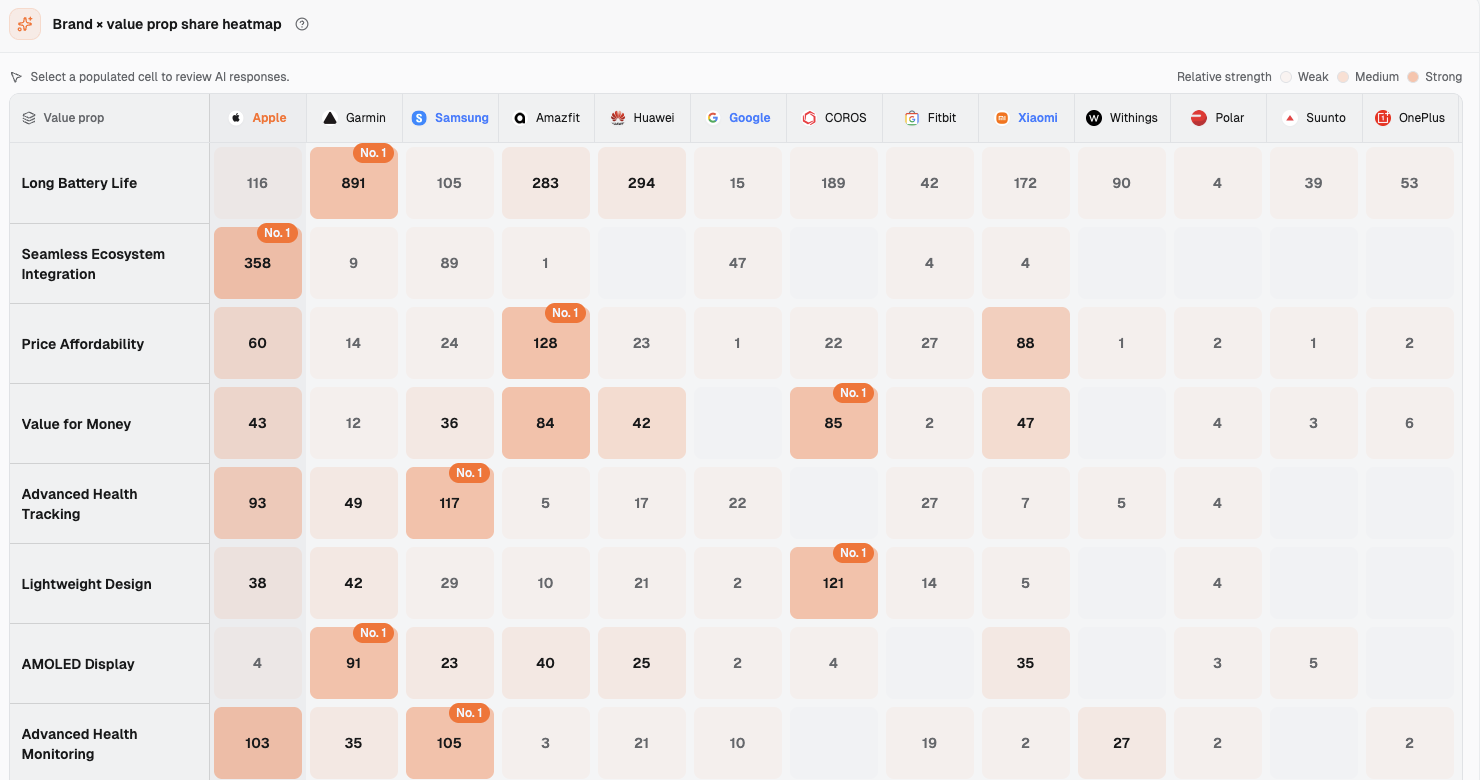
Brand × value prop share heatmap (Smart Watches market): Each cell shows the number of mentions in collected answers; Apple is the first column. The Blood Pressure Monitoring row used in this example appears farther down the table. Apple's cell there is 8. Clicking a cell with a value opens its answers.
The Brand value props numbers count associations between a brand and an attribute in collected answers. They are not watch performance scores and do not decide whether a claim is true. The panel shows the platform, region, full answer, and citation list; in this view it does not show the original question or collection time. Note those missing details in your record rather than inventing a question to complete the story.
2. Put each error on one line of a fact-correction record
One claim per row
One answer may get both a capability and a price wrong. Those claims need separate evidence, owners, and corrections, so give each its own row. The Netherlands Series 11 answer illustrates the format below. Its status is a to-do status, not a correction or retest that has already happened.
| Incorrect statement (verbatim) | Question that prompted it | Platform and region | URLs cited in the answer | Correct fact | Link supporting the correct fact | Owner | Status |
|---|---|---|---|---|---|---|---|
| Nieuwe gezondheidsfuncties: Voorzien van een bloeddrukmeter en waarschuwingen voor hypertensie (hoge bloeddruk). | Not shown in the panel | Google AI Mode, Netherlands (NL), Dutch | Apple's Dutch and English Newsroom pages on apple.com; vodafone.nl/smartwatch/apple-watch/apple-watch-11; other sources, 12 in total | Series 11 offers hypertension notifications and uses the optical heart sensor to analyze data over 30 days; after a notification, users are advised to log readings with a third-party blood pressure cuff for 7 days | Apple's official Series 11 Newsroom announcement | Product owner confirms the capability; legal/compliance owner approves health-claim wording; marketing owner follows up on pages | Third-party pages are the most likely source in the initial assessment; internal confirmation, edits, and retesting have not been done |
In a working record, keep the full source URLs, a way to find the original answer again, and a retrievable version of each page. The URLs in this table are shortened for readability. Open the citation list for the same answer and copy each URL, rather than saving only its domain. If the interface lists 12 sources, check all 12. Naming the main pages in the example row does not mean the others have been reviewed.
Dageno provides the original answer, platform and region, visible citations, and clues about brand-attribute associations. The brand must confirm the correct fact, whether a price includes tax, local eligibility for a feature, and wording that can be published, using its current documents and the appropriate owners. The original question and collection time are not visible in this panel, so write “Not shown in the panel.” Save the full question and observation time separately for later manual tests; do not pass off a new test question as the original one.
Move the status through real work stages: awaiting verification, fact confirmed, page awaiting edit, edited and awaiting retest, retest still incorrect, and retest accurate. If both your website and a third party need attention, track two actions and dates. A third-party page update does not mean a new AI answer has updated; maintain those statuses separately so the next owner and check are clear.
3. Follow the citations: Is the source your website, a third party, or unclear?
A: Your website has an outdated or ambiguous sentence
From the original answer, open the exact website URL that answer cites. Find the sentence closest to the disputed claim and check its model, region, version, and page date. If an old specification page presents a discontinued feature as current, or the product and support pages contradict each other, correct the relevant page and check whether other owned pages repeat the old claim. The fact-correction record should identify the answer's wording, the corresponding website sentence, the current evidence, and the URL to edit. Your domain appearing in a citation list alone does not establish that the error came from your website.
B: A cited third-party page contains the same claim
Describing the previous-generation Apple Watch Series 11, a Google AI Mode answer in the Netherlands (NL) says: “Nieuwe gezondheidsfuncties: Voorzien van een bloeddrukmeter en waarschuwingen voor hypertensie (hoge bloeddruk).” In English, that means “New health features: equipped with a blood pressure monitor and warnings for hypertension (high blood pressure).” The disputed phrase is “Voorzien van een bloeddrukmeter” (“equipped with a blood pressure monitor”).
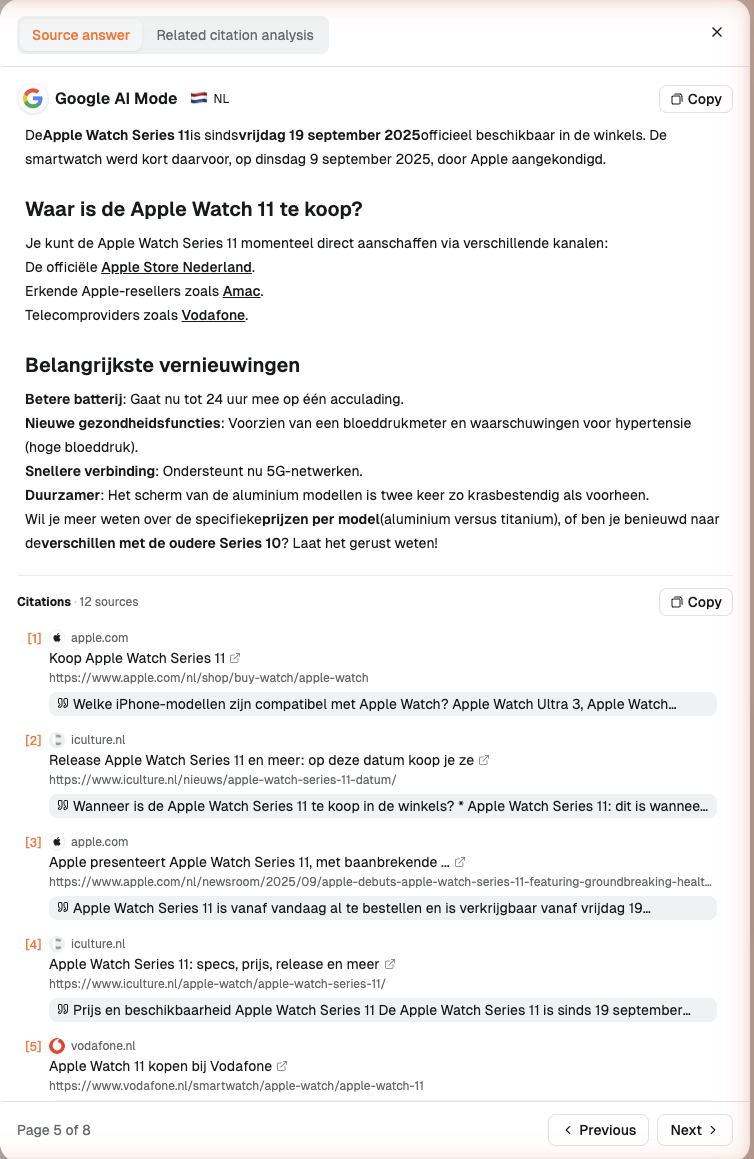
The Netherlands (NL) Google AI Mode original answer (item 5 of 8): The “Nieuwe gezondheidsfuncties” line says “Voorzien van een bloeddrukmeter.” Citations lists 12 sources below it; [1] and [3] are apple.com, and [5] is vodafone.nl in the screenshot.
Apple's official Series 11 announcement describes hypertension notifications. Its optical heart sensor analyzes how blood vessels respond to heartbeats over a 30-day period to identify signs of chronic high blood pressure. After a notification, Apple recommends logging readings for 7 days with a third-party blood pressure cuff and sharing them with a doctor. That cuff is a separate device, not a measuring feature built into the watch.
The answer lists 12 sources. Apple's Dutch-language announcement says “meldingen bij hoge bloeddruk” (“hypertension notifications”) and “maakt gebruik van de optische hartslagsensor” (“uses the optical heart sensor”). The English announcement explicitly says “third-party blood pressure cuff.” The official pages are cited, but their factual description is correct.
In the same citation list, the Vodafone NL Series 11 page says “Nieuw aan de Apple Watch Series 11 is de bloeddrukmeter.” (“The blood pressure monitor is new to Apple Watch Series 11.”) and “De Apple Watch Series 11 is de eerste Apple Watch die je bloeddruk kan meten.” (“Apple Watch Series 11 is the first Apple Watch that can measure your blood pressure.”) The iPhoned Series 11 page contains “Bloeddrukmeter” (“blood pressure monitor”) and “Bloeddrukmeter Ja” (“blood pressure monitor: yes”). The iCulture Series 11 page says “De Apple Watch Series 11 kan je bloeddruk meten.” (“Apple Watch Series 11 can measure your blood pressure.”) and also “Er is geen app waarmee je à la minute je bloeddruk kunt meten.” (“There is no app that can measure your blood pressure instantly.”) Comparing these exact sentences with the official explanation and the AI answer shows which cited pages contain the “equipped with a blood pressure monitor” claim.
On the visible evidence, the error most likely came from third-party pages. One answer can combine information from multiple sources; these external pages were retrieved on 2026-09-23, so their wording at the time the answer was collected cannot be established. If this were your brand, send the relevant quote, URL, official fact, and applicable model to each page owner for review, using the current statement on your website as the correction evidence. Record the request and the subsequent status of their page.
C: The visible citations do not explain the statement
Another Dutch-language Google AI Mode answer, from Belgium (BE), uses “bloeddrukmeting (hypertensie)” (“blood pressure measurement (hypertension)”). It lists 11 sources but no apple.com page. The PCMag source attached to the sentence says “hypertension notifications, which can alert you to signs of high blood pressure”; Stuff says “Hypertension notifications, sleep score tracking, ECG…”. Both describe notifications. The cited passages do not directly explain why the answer says “blood pressure measurement.” Record its source as “cannot yet be determined”. Keep the answer and citations without assigning responsibility to any particular site.
If no citation is visible, likewise mark the source “cannot yet be determined.” Check first whether the answer confuses a brand, model, or product category. Then put a clear statement about the current model on the appropriate factual page or FAQ on your website. A clear official statement gives readers and future reviewers something to check; observe new answers to see whether AI later uses it.
4. Why check your website first, and what should you change?
Confirm your website's facts before deciding to edit
Your website is the product-fact source your brand can maintain directly. Product teams can confirm current specifications, content teams can update localized product pages promptly, and third-party authors can use those pages to assess correction requests. Checking your website first means looking for mistakes and unclear boundaries. Correct any mistakes you find. If the facts are already accurate, do not replace them merely to match one AI answer.
The Series 11 case is an example of the latter. The official announcement already distinguishes hypertension notifications from a third-party blood pressure cuff. Here is an editorial option for your own site: when an AI answer or cited third-party page presents “hypertension notifications” as “the watch gives direct blood pressure readings,” consider adding an explicit negative statement to the relevant product page or FAQ, such as “The watch does not display blood pressure readings,” with a link to the full feature explanation. Product and compliance teams must check any proposed new wording. If a cited third party makes a different specific claim, request its review in parallel.
Fill the gap exposed by the incorrect claim
The content team can turn “Which sentence did the answer get wrong?” into a page acceptance check. State the product category in one complete sentence with the brand and product, so an excerpt still has a clear subject. Under audience and conditions, name who the product suits, who it does not, and any region, device, account, or service requirements. Put capabilities and limits next to each other. For health claims, distinguish an alert about possible risk from a measured reading.
For old models or policies, put the model, software version, and effective date beside the relevant fact. Do not let a historical page look like a promise about the current product. In the same purchasing information block, specify the currency, region, tax, billing period, required accessory or plan, discount eligibility, and validity period. Changing a homepage line to “affordable” cannot tell a buyer in a particular region what they will pay.
Finally, write a FAQ that directly addresses the mistaken claim. For example: “Can this watch give me a blood pressure reading?” Answer that question in the first sentence, then explain which data underlies hypertension notifications and how a user should record readings separately after a notification. The page needs verifiable facts; the FAQ puts them where a reader would ask for them. Google's helpful, reliable content guidance calls for accurate content that clearly addresses readers' questions. Here the question-and-answer format helps people read and verify the facts.
Put each fact on the page responsible for it
| Page | What belongs there | How to connect the evidence |
|---|---|---|
| Product page | Category, intended users, key capabilities, and prerequisites | Link detailed specifications or the formal feature explanation beside the capability claim |
| Specifications page | Model, version, figures, units, and compatibility | Keep numbers and limits together, with an applicable date |
| FAQ | The specific question behind this error and a short answer | Link current product or support materials in the answer |
| Support page | Setup steps, exceptions, regional policies, and changes to older versions | Name affected models and the currently valid explanation |
An edit task should name an exact URL and paragraph. If a specifications page still claims an old model has a feature, correct it and check whether the product page points to the updated explanation. If your site is correct but a third party says something else, preserve your site's facts and give the third party the URL and precise correction evidence.
5. Who signs off on product facts, pricing conditions, and compliance wording?
The product owner checks the model, function, hardware and software requirements, and the version of the evidence supporting the fact. The product marketing or brand communications owner puts the approved wording on product pages, specifications, and FAQs, aligns localized pages, and supplies correction material to relevant external page owners. The pricing or commercial owner checks local currency, taxes, plans, validity periods, and exceptions. Those terms cannot be inferred from old marketing copy.
The legal or compliance owner reviews regulated health or financial claims, eligibility, and required footnotes. Apple's Series 11 announcement discusses regulatory clearance and regional availability. The footnotes on Apple's watch comparison page also list age and population restrictions, including people under 22, people already diagnosed with hypertension, and pregnant people. Replacing “notification” with “measurement” changes the technical fact and can change a user's understanding of the feature's purpose. A proposed negative statement, local version, and qualifications therefore need appropriate review before publication.
The owners should confirm what the product can really do; correcting AI is no reason to add a capability the product lacks. A selling point the AI did not mention can be logged separately as a communications issue. Only a specific assertion that conflicts with current facts belongs in this fact-correction record. Attach current evidence for pricing and health wording, and change a status to “ready to publish” only after the necessary internal sign-offs.
6. How to retest after a correction
Keep conditions comparable instead of relying on dashboard totals
Before an edit, save the exact answer text, product model, platform, region, language, visible citations, and the source pages as they appeared then. If your team independently has the full question and conversation context, save those too. Leave the original question and collection time blank if they are not visible in this Dageno panel. Log the website or third-party URL actually changed, what changed, and when it was published. Set a date to observe again, then manually test with the same complete question on the same platform in the same region, or wait for comparable answers from a later collection round.
This Evidence preview panel shows only previously collected answers; it has no way to submit a new question. Opening an old answer, adding a target URL, or refreshing the page is not a new test. When a new collection round appears, return to the same cell and compare the wording and new citations row by row. For a manual test, add the full question, language, platform, region, observation time, and conversation conditions to the fact-correction record. Note any change in platform mode or product version separately rather than combining unlike conditions in one comparison.
For each row, record three things: whether the source page is now accurate, whether a later answer still makes the same specific error, and what that answer cites. If it remains wrong, inspect the new citations and local-version conditions for another conflicting public statement. If it is right, save the new text and mark “accurate in this round.” An error disappearing in one later answer establishes only that observation; it does not prove that the page edit caused the change.
You can add an edited URL to Effect tracking to watch its subsequent citations and brand mentions. A change in citations and the accuracy of the wording are separate records. Use the target URL's performance for the former and human review of each new answer for the latter. For a broader set of comparable questions, see the AI search visibility guide. This fact-correction record still tracks the exact error, evidence, and status of this case.
7. Conclusion
The useful output when AI misdescribes your brand is an actionable row: its exact wording, the applicable product, current official fact, answer citations, source classification, URL to change or page owner to contact, person responsible, and next observation conditions. Correct your website when it is wrong. Keep accurate wording when it is already right, adding a clearer boundary where appropriate. Send supporting evidence to a third party whose page contains the disputed claim. If visible citations cannot explain the claim, leave its source undetermined and keep observing. For the NL Series 11 record, the next step for the brand team would be to review page wording and decide whether to send correction evidence to the relevant third parties.
8. FAQ
Should I change my website immediately if AI was wrong only once?
First check the official facts for the applicable model and region. If your website itself is wrong, especially about a key capability, price, or health feature, correct it immediately. If it is accurate and you have seen the mistake only once, preserve the answer and citations and schedule another observation under the same conditions.
Does a citation to my website mean the error is on my website?
Not necessarily. Open the exact cited page and find the sentence corresponding to the disputed claim. In the NL case, Apple's official page describes hypertension notifications, while the Vodafone NL page cited by the same answer says Series 11 added a blood pressure monitor. Check each page rather than deciding from the presence of your domain in the citation list.
A third-party article presents an old price as current. Which page should I change first?
Check your website's current price, currency, region, taxes, plan, and effective date first. Update any outdated statement on your site. If the third-party page has the old price, send its owner the exact quote and a link to the current terms for review. Track the status of both pages separately.
What if the answer has no visible citations?
Mark the source “cannot yet be determined,” and keep the original answer, platform, region, and applicable product. Check whether your website states the facts clearly, then compare the wording and visible sources in the next answer under the same conditions.
How do I record a later answer that gets the fact right?
Save its exact wording, question, platform, region, time, and new citations. Update the row to “accurate in this round.” Keep the page-edit record and continue observing similar questions. Log citation and mention data from Effect tracking separately.
9. References
Apple Newsroom: Apple Watch Series 11 hypertension notifications and usage guidance
Apple: Watch model comparison and hypertension notification eligibility
Google Search Central: Creating helpful, reliable, people-first content
About the Author

Updated by
Dageno
Dageno is the research and insights team at Dageno AI, publishing industry reports and expert analysis on AI Search Visibility, Generative Engine Optimization (GEO), and AI-powered search discovery.
Related Articles
AEO vs GEO vs SEO: The Complete Guide to Search Optimization Strategies

Ye Faye • Apr 21, 2026
5 Best Claude Mentions Tracker Tools in 2026

Tim • Sep 11, 2026
Top 9 Scrunch AI Alternatives for AI Brand Visibility in 2026 — Ranked
Ye Faye • Sep 11, 2026
PR for AI Search Visibility: How Earned Media Drives AI Citations in 2026
Dageno • Apr 02, 2026