Mentioned in General Questions but Missing from Buying Decisions: What Should GEO Fix First?
Your brand appears in general questions but is missing from buying decisions. Use valid answer counts to understand dashboard priorities, then confirm product fit and turn the first few gaps into page tasks.
Track AI search visibilityNo install
Updated by
AI-assisted for research support
11 Min Read
Updated on Sep 21, 2026
1. TL;DR
- Start with buying questions where your brand is repeatedly absent. When several questions show the same absence, prioritize the one backed by more valid answers. When multiple gaps are at 0%, first check the number of valid answers behind each, then follow the dashboard priorities to investigate product fit and page evidence.
- In one observation of the Electronic Card Readers market, Choose for your needs had 94 Valid answers and was marked High priority. See top recommendations, with 17, and Choose by budget or tier, with 4, were both marked Low priority.
- Selection, regional, platform, and Ghost citation gaps call for different checks: buying conditions, regional requirements, platform answers, and citation relationships. Identify the gap before deciding whether to add page facts, clarify selection reasons, or address external sources.
- Turn each priority into one task row identifying the page, information to add, person confirming the facts, reason for its priority, and evidence links. At review time, keep the questions, regions, platforms, and time-window criteria consistent, and check whether the original order made sense.
2. Present in General Questions, Missing from Buying Questions: First Check Whether It Keeps Happening
2.1 Confirm the Gap on the Same Page and at the Same Level
When buyers ask how a product works or what it can do, AI answers mention your brand. But when they ask which one to choose, what to buy within a budget, or what is recommended, the list contains only other brands. The product marketing team's next decision is which buying questions deserve attention first, and which pages to investigate.
Start in Dageno under Demand & insights → Search intents. Select one market, compare the primary intents, then examine individual sub-intents.
For this discussion, we call questions about capabilities and usage guidance “general questions,” and questions about choosing products, selecting by budget, or recommending candidates “buying-decision questions.” This is an editorial classification for this article, not an official standard or a Dageno field. When investigating, use the purpose and conditions in the full question to assess the buying need.
On September 21, 2026, Apple's Search intents data in the Electronic Card Readers market showed this gap:
| Primary intent | Average visibility | Observation |
|---|---|---|
| Recommendations | 0% | All three sub-intents, Choose by budget or tier, Choose for your needs, and See top recommendations, were marked absent |
| Capabilities, fit & availability | 14.29% | The brand appeared in capability and fit questions |
| How-to & guidance | 12.50% | The brand appeared in usage guidance |
All three figures come from the same page and the same level. The brand already appears in capability questions and usage guidance, while selection recommendations remain at zero. The next step is to examine buying answers under the three absent sub-intents.
The same page shows an Intent distribution of 76.16% for Recommendations. That percentage describes the intent mix on the current page; Average visibility in the table describes the brand's average visibility within each primary intent. Record the demand mix and brand performance separately when reading the chart.
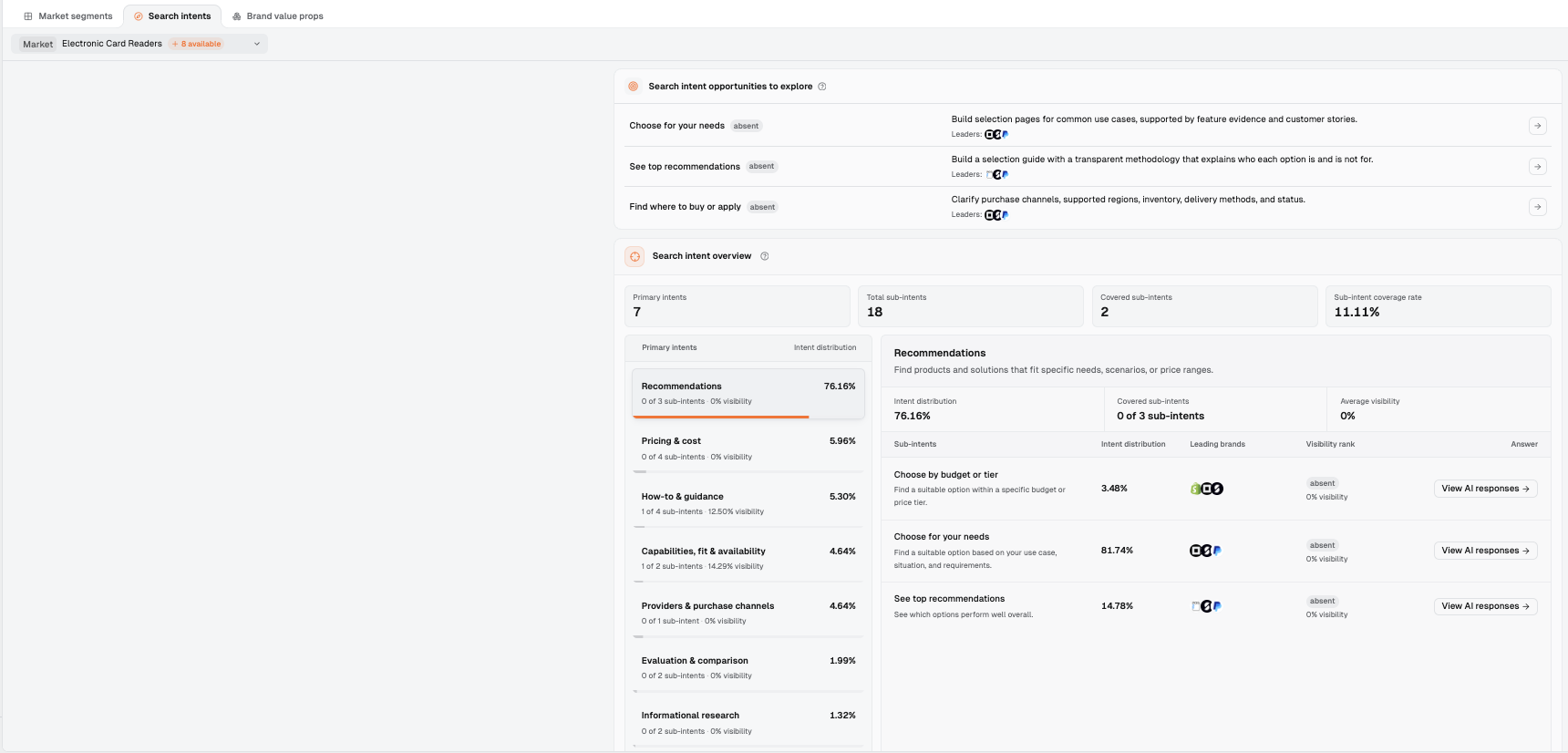
Figure 2: Search intents lists the primary intents and their visibility together on the left. On the right, Recommendations is expanded to show its three absent sub-intents and an Intent distribution of 76.16%.
Percentages from different pages and different levels cannot be compared side by side. The method for analyzing recommendation differences across AI platforms likewise emphasizes checking the denominator and scope first. That article addresses differences between platforms; here, the first step is to align intent levels within one market.
Save this primary-intent comparison and note the three buying sub-intents to investigate next.
2.2 Open Full Answers Within the Sub-intent, Then Check Whether the Absence Persists
Find the relevant Selection coverage gap under Action → Issues & opportunities. Click View analysis, then use View related AI responses to open the individual answers.
Read the full question first: what buying task is the user trying to complete, and what use, budget, or regional conditions have they specified? Then read the answer: who is recommended, why, and does your brand appear? If it does, what role does it play? Save these details along with the platform, region, and observation date.
Begin ongoing optimization when the same buying sub-intent remains at 0% across comparable observations, backed by enough valid answers. If you have only one observation or very few answers, save the records and gather more observations first. To assess whether the evidence is sufficient, check two things: whether the brand is absent across multiple questions about similar needs, and whether it remains absent from the same question at different times.
SparkToro's research on AI brand recommendation consistency found that recommendation lists can change for the same question. Aggregating repeated observations helps identify brands that regularly enter the consideration set. For content teams, an individual answer helps reveal recommendation reasons; multiple comparable answers help establish whether a problem persists.
The market data here records the state observed during the review. To assess persistence, save subsequent results using the same questions and observation conditions. Organize the full answers first, then add buying sub-intents with persistent absence and sufficient evidence to the priority review list.
3. Why Does Your Brand Appear in General Questions but Not Buying Questions?
In page diagnosis, a common starting point is a page that explains how to use a product but leaves buyers unsure when to choose it. Setup instructions can answer operational questions. Selection answers also need to establish who the product suits, which requirements it meets, and the trade-offs against alternatives.
Buying answers also compare candidates, making third-party reviews and comparison pages worth checking early. Ahrefs' study of source types in ChatGPT recommendation answers documented widespread use of recommendation lists in these answers. Its sources included both vendor-owned content and third-party pages. When investigating your own answers, check which selection reasons they actually use and which page supports each reason.
If you have confirmed that the product meets the buying conditions but it is still missing from recommendations, continue with the content and evidence diagnosis for products that fit but receive no AI recommendation. To decide which investigation comes first, return to the current market's opportunity records and valid answer counts.
4. Which Buying Questions Should You Cover First?
4.1 When Every Gap Is at 0%, Check How Many Valid Answers Support Each One
Open Opportunity overview in Issues & opportunities and compare the three Selection coverage gap records in the Electronic Card Readers market:
| Selection sub-intent | Your brand visibility | Valid answers | Priority |
|---|---|---|---|
| Choose for your needs | 0% | 94 | High priority |
| See top recommendations | 0% | 17 | Low priority |
| Choose by budget or tier | 0% | 4 | Low priority |
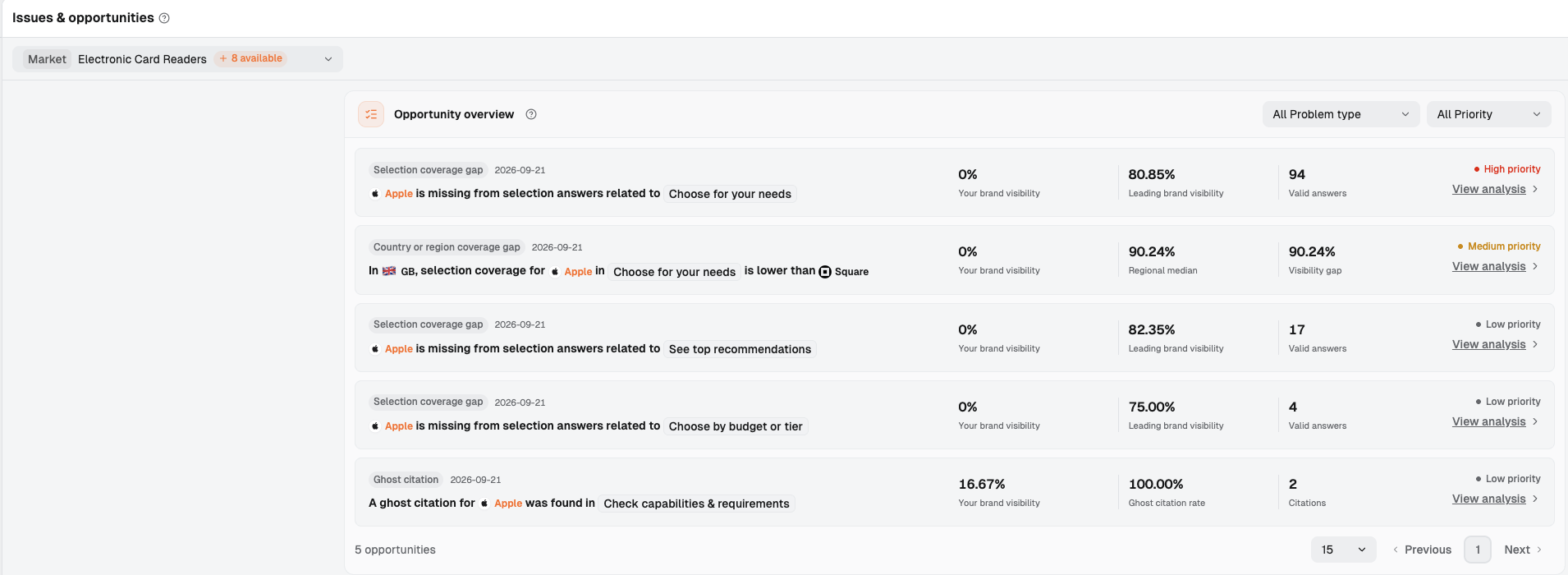
Figure 1: Brand visibility is 0% across all three Selection coverage gap records. The record with 94 Valid answers is marked High priority; those with 17 and 4 are marked Low priority.
Looking only at 0% makes all three seem equally urgent. Add Valid answers, and the order becomes clear: the absence in Choose for your needs is supported by more valid answers, and the dashboard marks it High priority. The other two are marked Low priority.
In these records, the key to deciding what to investigate first is the number of valid answers behind the gap. A gap supported by 94 answers deserves an earlier investment in reading answers, finding shared buying conditions, and examining pages. The budget question with only 4 answers stays further down the queue and can be reassessed as records accumulate.
These priorities come from the dashboard. Read Priority first, then Valid answers, which tells you how many answers sit behind the gap. Next, open the answers to establish which needs those records cover and which are relevant to your target buyers.
This order also separates two tasks: valid answer counts help decide where to investigate first; business value, product fit, and page evidence help decide what to do after investigating. The team can focus first on gaps with stronger evidence, then decide whether to invest in page changes.
Open the High priority record for Choose for your needs first, and identify the buying questions most relevant to your target buyers.
4.2 Four Gap Types Call for Different Next Steps
Four Problem type values have appeared in Issues & opportunities. Each points to a different subject to investigate and a different kind of work:
| Problem type | What to confirm first | What to assign once the evidence supports it |
|---|---|---|
| Selection coverage gap | Buying requirements, reasons candidates were selected, and your product's fit | Update the page serving that buying question with missing facts or selection reasons |
| Country or region coverage gap | Product, cost, availability, or service conditions in the specific region | Have regional business and product owners verify the conditions, then address the regional page or source |
| LLM coverage gap | Which platform and buying sub-intent are weak, and what the actual answers and sources contain | Use that platform's evidence to decide whether to update a shared page or address a specific source |
| Ghost citation | Which page was cited, whose product the facts concern, and how the answer uses them | Compare the page and answer to check whether product attribution, selection reasons, or external descriptions need more information |
These are suggested actions based on the gap. For example, in the same Electronic Card Readers market, the regional gap for Choose for your needs in GB is marked Medium priority. Start that investigation with local buyers' conditions, then find product and page evidence that applies to the region.
A Ghost citation also appears under Check capabilities & requirements. Its card shows a Ghost citation rate of 100.00%, Citations of 2, and Priority of Low priority. Start with the cited pages and answers, and verify the relationship between the facts and the brand. Valid answers counts the valid answers behind a gap; Citations counts how many times pages were cited. Record answer counts and citation counts separately.
Brands with strong overall rankings also benefit from this review. In the Smart Watches market overview, Apple's Visibility is 62.31% and its Visibility rank is #1.
Now consider a separate LLM coverage gap record in that market: for See top recommendations on Google AI Overview, Model visibility is 35.71%, while Model median on the same card is 72.00%. The dashboard marks it Medium priority. This record narrows the next investigation to a specific buying question on a specific platform.

Figure 4: Market is set to Smart Watches, with two LLM coverage gap records currently listed. For See top recommendations on Google AI Overview, Model visibility is 35.71%, Model median is 72.00%, and Visibility gap is 36.29%. For Find where to buy or apply on ChatGPT, Model visibility is 20.00%, Model median is 45.61%, and Visibility gap is 25.61%. Both are marked Medium priority.
The overview establishes the brand's market position, while opportunity cards identify the buying questions to investigate next. Note the Problem type for each selected record, and assign someone who can verify those conditions.
4.3 The Dashboard Sets the Priority; the Customer Confirms Whether It Is Worth the Work
High priority moves a question toward the front of the investigation list. The product marketing lead still needs to work with the product team to establish whether this buying question is worth winning, whether the product genuinely fits, and which page should address it.
Those decisions require comparing the questions, answers, and existing materials:
| Material | What it helps establish | What the customer needs to confirm |
|---|---|---|
| Question set | Which specific buying needs the answers cover | Whether they come from target customers and merit investment |
| Intent labels | Which intent and sub-intent contain the question | Whether the actual use and product category match the target market |
| Position and context within the answer | Whether the brand is a candidate, a passing mention, or excluded by a condition | Whether these buyers are customers the business wants to serve |
| Existing pages | Which page already addresses the question and which selection reasons it provides | Who maintains it and whether it suits this buying task |
| Product facts | How product capabilities match buyers' conditions | Whether the product truly fits and who confirms that the claims are accurate |
For example, after opening Choose for your needs, read the question's actual use case and assess whether it is a need you serve. If the product owner confirms that the product meets the conditions, examine the existing page next. If a necessary condition falls outside the product's current scope, have the product and marketing leads decide whether the need is worth covering, and move the content task back accordingly.
If the brand is entirely absent from relevant answers, start by establishing the scope with the diagnostic process for a brand missing from AI answers. This article addresses an observed gap between intents within one market, focusing on how to allocate limited team time to specific buying questions.
Have the product marketing lead and product owner confirm business value and actual fit, then identify the page and its owner.
5. What Evidence Is Enough to Explain the Gap?
5.1 Examine Owned Pages, Product Facts, and External Sources Separately
Once you have decided what to investigate first, bring together three types of evidence to explain the brand's absence:
| Evidence | What to examine | What it helps determine |
|---|---|---|
| Owned pages | Whether they explain user conditions, suitable use cases, selection reasons, and limitations | Which information is missing and which wording needs revision |
| Product facts | Whether current product documentation, terms, or verifiable records support the buyer's conditions | Whether the product fits and the exact scope of that fit |
| External sources | How cited pages select products and describe the brand, and whether their content still applies | Whether external information is missing, outdated, or based on different selection reasons |
Examine all three before writing an explanation for the gap. If the product owner confirms a capability exists but the relevant page leaves its conditions unclear, the page needs an update: add those conditions. If the website's information is already complete but the answer cites an external page describing old conditions, address that source.
Check product facts and page wording separately too. A page's claim that a product is “suitable for certain users” needs support from documentation or real usage evidence. An existing feature also needs a page explanation of how it meets this buying requirement.
To decide whether to improve the page or external evidence first, use the guide to choosing between page information and external proof when Google rankings are strong but AI mentions are missing to identify the specific missing information.
For each priority, save the page content, supporting product facts, and external source records separately, then state why they support the proposed action.
5.2 Use the Drawer to Locate the Problem, Then Verify the Cause in the Answers
Open the High priority record for Choose for your needs and go to View analysis → Original evidence. Where the problem occurs identifies the issue in three columns:
| Column | Content shown in this example | What to look for |
|---|---|---|
| What the user is doing | Find products and solutions that fit specific needs, scenarios, or price ranges. | The user is seeking products and solutions that meet specific needs, scenarios, or price ranges |
| Sub-intents | Choose for your needs | The sub-intent containing the gap |
| Observed result | Selection coverage gap | The type of problem currently observed |
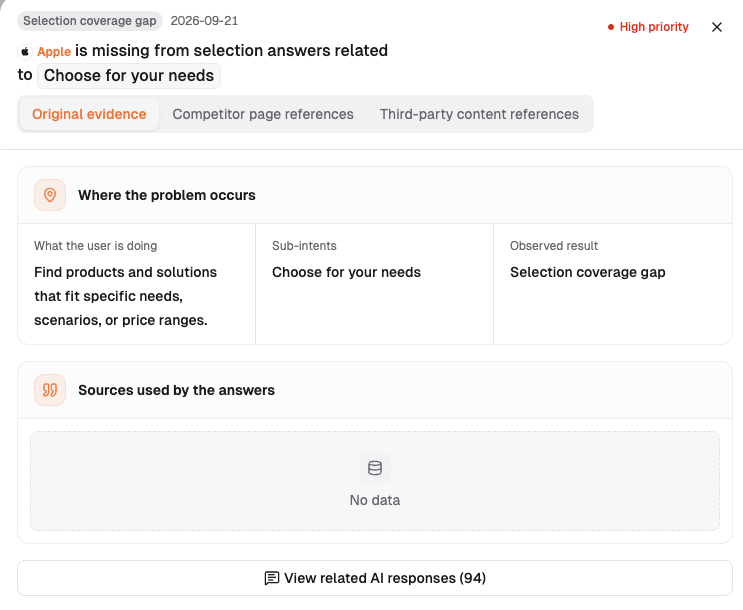
Figure 3: Original evidence shows the user task, the Choose for your needs sub-intent, and Selection coverage gap. Sources used by the answers displays No data for this record, with View related AI responses below.
These columns identify the type of buying question to investigate. Click View related AI responses, read the full questions and answers, and match each candidate's recommendation reasons to the buyer's conditions.
Sources used by the answers displays No data for this record, so source evidence still needs to be gathered. The drawer also has Competitor page references and Third-party content references tabs; start with the entries actually shown. If an answer includes source URLs, open those pages to verify the relevant recommendation reasons.
Save the actual question, answer content, and available source URLs from the answer view, and list the missing evidence separately.
6. How Do You Turn a Priority into a Specific Page Task?
6.1 Give Each Priority Its Own Task Row
The task a team receives should specify which page lacks which buying information. Put each confirmed priority into one row, with at least the following details:
| Buying question | Page to update | Information to add | Where the evidence is |
|---|---|---|---|
| Save the full question, sub-intent, and regional and platform conditions | Enter the actual page URL | Identify the missing buying condition, selection reason, or incorrect statement | Add links to the answer record, supporting product evidence, and source URLs |
Each task should also identify who verifies the facts and who updates the page. Explain its place in the queue by recording the dashboard priority, relevant evidence volume, business value, and reasons the product fits. Finally, record the edit date, the fixed questions and observation conditions for the review, and the review date.
For example, if the product owner confirms that the product meets a buyer's necessary condition but the relevant page omits it, the task could be: update the selected product page by adding conditions, limitations, and current evidence beside the relevant capability description. The product owner confirms the facts, and the page owner makes the change. Include the buying question, dashboard priority, and supporting answer records in the task row.
Put the answer records and source URLs supporting the change in two places. The team task sheet holds full answers, product documentation, and external source URLs for review. The public page places shareable evidence beside the facts it supports, so buyers can verify them directly.
If the target is a third-party page, record its URL, the exact statement to correct, and who will verify the information and contact the author. Turn the first confirmed opportunity into a complete task row, and send the proposed addition to the person responsible for confirming the facts.
6.2 Work on the First Few Tasks, Letting the Evidence Determine the Page Content
Start with a few tasks near the front of the queue where fit is confirmed and a specific evidence gap has been found. Keep the current records for the remaining items, along with what they need before work can proceed.
Before editing, check whether an existing page can serve the buying need. Organize the information as a direct answer, conditions, selection reasons, limitations, and evidence. For example, if a page already describes a capability, explain nearby which needs it suits, what it requires, and where buyers can verify the information.
Microsoft's guide to organizing content for AI search answers recommends answering users' questions with specific facts and context, using direct Q&As, lists, and comparison tables. Teams can use this approach to explain selection conditions clearly enough for buyers to judge fit.
Keep the original usage instructions serving operational needs, and place buying information where the page addresses selection. Plan a new page only when existing pages struggle to answer a distinct buying task clearly.
For this round, move forward with the first few tasks that have factual support, a suitable page, and an owner, and specify what each remaining task still needs.
7. What Should Stay Fixed During Review, and Which Conclusions Are Still Out of Reach?
7.1 Keep Comparison Conditions Consistent, Then Revisit the Items Prioritized First
Before making changes, save a set of complete buying questions and fix the market, brand, regions, and platforms. First, retain the baseline's start and end dates. Then use observation windows of the same length and the same sampling method. Record the actual dates and valid answer counts for both the old and new windows.
On the review date, check each item:
- Do the buying questions originally prioritized still have comparable evidence volume and business value?
- Has the page received the specified information, and do subsequent answers use the relevant facts and selection reasons accurately?
- Have items further down the queue gained evidence that warrants changing their priority?
The review should establish whether the original order was right. If investigating a high-priority item reveals that the product does not fit, record that finding and adjust the queue. If a lower-priority buying question accumulates more valid answers and falls within the target business, reassess its position.
Record page updates, source changes, and answer changes separately in the relevant task row. If the main problem becomes a sudden decline on the same platform between time windows, continue with the diagnostic guide to a sudden drop in AI search visibility.
Record the review result for each original question, and explain whether its task should retain its position, move up, move back, or remain under observation.
7.2 Keep Unresolved Questions in a Separate Record
Reserve a separate area in the review record for “what we have observed, what evidence is missing, who will investigate next, and when to review again.” Put verified findings into the conclusions, and keep tracking the remaining questions in this separate area.
| What you have observed | Evidence still needed | Next action |
|---|---|---|
| The current buying sub-intent is at 0% | Follow-up observations using the same questions and scope | Keep saving answers within fixed windows to check whether the absence persists |
| Sources used by the answers displays No data | Individual answers and available source records | Read the answers, collect source URLs, and record what is still missing |
| The page has been confirmed to include the buying conditions | How subsequent answers describe those conditions | Check facts, selection reasons, and sources against the original question |
| Answer performance changes after a page update | Records of changes to question scope, sources, and product conditions over the same period | Save these changes separately and continue checking which explanations have evidence |
Assign an owner to each unresolved question, and record the next piece of evidence to find and the review date.
8. Conclusion
When your brand appears in general questions but is missing from buying questions, first confirm the gap on the same page and at the same level. Then examine specific buying sub-intents, using dashboard priorities and valid answer counts to decide the investigation order. Have the customer confirm business value, product fit, and the page that should address the need.
The team ultimately needs a few actionable tasks: which page to change, what to add, who confirms it, why it comes first, and where the evidence is. Start with the highest-priority buying question for which fit is confirmed, complete its task row, and agree on the review conditions.
9. Frequently Asked Questions
9.1 Why Examine Buying Questions Separately When General Questions Already Mention the Brand?
Capability explanations, usage guidance, and product selection serve different tasks. To establish whether the brand enters the consideration set, read specific buying answers. Use the AI search visibility guide's distinctions between mentions, recommendations, citations, and accurate descriptions to record its role. Choose a target buyer's question, read the full answer, and note how the brand appears.
9.2 If All Three Gaps Are at 0%, Which Should We Fix First?
Start with Priority and Valid answers on the dashboard. In this example, 94 valid answers correspond to High priority, while 17 and 4 correspond to Low priority. Investigate the record with more evidence first, identify buying questions worth pursuing that the product can serve, then determine the page changes.
9.3 What Should the Team Do First When High priority Appears?
Confirm the question's business value, actual product fit, and the page that should address it, and open the full answer to check the selection conditions. If fit is still unclear, have the product owner provide factual evidence first. Have the product and marketing leads agree on the target question before assigning the page task.
9.4 Where Should We Look When the Sources Section in View analysis Shows No data?
Sources used by the answers is empty in this example. Use View related AI responses to read the actual answers. Verify any source links individually, and keep missing evidence in the follow-up record. Save the answers you have obtained, and specify which source evidence you still need.
9.5 How Do We Decide Whether the Original Priorities Were Right?
Use the same question set, regional and platform scope, and time-window criteria. Check whether the tasks completed first still serve important needs and have addressed confirmed information gaps, while looking for evidence that warrants moving other items up the queue. Add evidence changes and reasons for the order to the original task rows, then choose the next round of tasks.
10. References
- SparkToro: AI Brand Recommendation Consistency and Repeated Observations, 2026-01-27
- Ahrefs: Use of Recommendation Lists in ChatGPT Sources, 2025-12-04
- Microsoft: Content Organization for AI Search Answers, 2025-10-08
- Dageno: Checking Cross-Platform Recommendation Differences and Comparison Denominators
- Dageno: Diagnosing Content and Evidence When a Suitable Product Receives No AI Recommendation
About the Author

Updated by
Dageno
Dageno is the research and insights team at Dageno AI, publishing industry reports and expert analysis on AI Search Visibility, Generative Engine Optimization (GEO), and AI-powered search discovery.