Is Your Brand Invisible to AI? Here Is How to Fix It
AI keeps recommending competitors while leaving your brand out. Identify the questions where it is missing, then examine recommendation reasons and cited pages to decide whether to clarify your brand, add product details, or strengthen the evidence.
Track AI search visibilityNo install
Updated by
AI-assisted for research support
13 Min Read
Updated on Sep 18, 2026
TL;DR
- Your brand may be missing from relevant AI answers because your content is inaccessible, your brand description is unclear, your pages leave users' questions unanswered, external evidence is missing, or the content offers little worth citing. First identify the affected questions, platforms, and regions, then investigate the cause.
- Use questions that name your brand to check whether it is described accurately. Use category, alternative, and use-case questions that omit your brand name to see whether it makes the shortlist. Keep the two sets of results separate.
- Compare buyer requirements, recommendation reasons, and cited pages together. Once you find a specific gap, decide whether to revise the brand description, add information to a page, or gather external evidence.
- Use Accessible → Understandable → Relevant → Credible → Citeable to choose the first task supported by evidence. After making the change, return to the original questions to review the results.
AI buying advice keeps recommending competitors while leaving out your brand. What should you change first? Before adding content, identify which questions produce answers that leave your brand out.
Record the platform, region, complete question, and observation date. If you have historical records, specify the time range. If you have only just started checking, begin with the answers you have.
If your brand used to appear and has only recently lost visibility, use these steps for investigating an AI search visibility drop to check what changed.
1. What Does “Invisible to AI” Mean for Your Brand?
Here, “invisible” means your brand is missing from the answers you have checked or has been left off the shortlist for the relevant need. Answer records do not tell you whether a model knows the brand or encountered it during training.
Start by organizing your observations into three situations:
| What you see | How to verify it | What to check next |
|---|---|---|
| The brand is missing from the answer text | Read the complete answer and check the official name, common names, and product names clearly associated with the brand; separately check whether its website appears among the sources | Whether you selected the right market, whether the brand description is accurate, and whether key pages are accessible |
| The brand appears but is not recommended | Read the wording around the brand: is it a candidate, merely used for comparison, or excluded because of a requirement? | Whether the product fits and which selection criteria the answer uses |
| Only competitors appear in comparable questions | For buying questions that omit your brand name, record the competitors, recommendation reasons, and sources, then review comparable answers | Which needs competitors meet and which pages provide the evidence |
The third situation usually also falls under the first; it also tells you who the competitors are. A citation of your website without a brand mention in the answer text is a ghost citation. Use the AI search visibility guide to distinguish mentions, recommendations, citations, and the accuracy of brand descriptions.
In Dageno, select your target market, check visibility and relative rank in Brand overview, then open specific answers through the relevant needs. If a view is empty, shows no data, or lacks answer records, mark it for investigation. Bing's AI Performance data guidance also notes that very limited citation activity may be absent from aggregated reports.
If you have confirmed that the product fits but it still receives no recommendations, continue with this content diagnosis for products that fit but are not recommended. If strong Google rankings are what make the absence puzzling, compare the two outcomes using these checks of page information and external evidence.
2. Choose the Right Questions to Find Where Your Brand Is Missing
What Does Each of the Four Question Groups Check?
Draw questions from sales inquiries, support records, customer interviews, and existing search data. Prioritize the users and regions your product actually serves. The four groups below organize the checks so you can review them one at a time. Budgets, features, and scenarios in the questions should come from real business needs.
| Question group | How to choose and phrase questions | What to look for |
|---|---|---|
| Brand queries | Ask with your own brand name: “What payment devices does this company offer, and who does it mainly serve?” Then check features, costs, or regions as needed | Whether the answer identifies the right company and accurately describes its product category and target customers |
| Category queries | Use the category names customers use, such as “Which mobile card readers are suitable for small merchants?” | Whether the brand makes the category shortlist without its name being supplied |
| Competitor alternatives | Choose a competitor customers actually consider, such as “What alternatives to SumUp mobile card readers are suitable for small merchants?” | Whether your brand appears as an alternative and why it is selected |
| Use-case queries | Describe the task, such as “My shop needs to accept card and contactless payments. I need to know the per-transaction rates and whether there is a monthly fee. Which mobile card readers could I choose?” | Whether the brand makes the shortlist for a specific task when the question goes beyond a category term |
These are illustrative questions for small merchants choosing a mobile card reader. When writing your own questions, add real conditions that affect the choice, such as operating region, payment methods, per-transaction rates, or monthly fees. Avoid tailoring questions to favor your own product.
Track questions that name the brand separately from those that omit it. When a question already contains the brand name, it is normal for the answer to repeat it. Category and use-case questions show which options users see without naming your brand. Keep competitor-alternative questions separate too, because the question already specifies whom to compare against.
Find the Intent That Matches the Task in Dageno
The four question groups have no one-to-one mapping to Dageno's seven intent categories: a single question can name a brand while also asking about costs or specifying a use case. Choose the relevant view based on the task:
| What the user wants to do | Relevant intent and sub-intents to review |
|---|---|
| Get a shortlist | Recommendations; use See top recommendations for general recommendations and Choose for your needs for use-case recommendations |
| Find an alternative to a product | Recommendations → Find alternatives |
| Check features, fit, or availability | Capabilities, fit & availability |
| Learn about a brand, category, or concept | Informational research |
| Compare strengths, weaknesses, and suitability | Evaluation & comparison |
| Learn how to set up, implement, or use something | How-to & guidance |
| Check fees and total costs | Pricing & cost |
| Find a place to buy or a provider | Providers & purchase channels |
Go to Demand & insights → Search intents, confirm the Market, select the relevant primary intent, and click View AI responses in the sub-intent row.
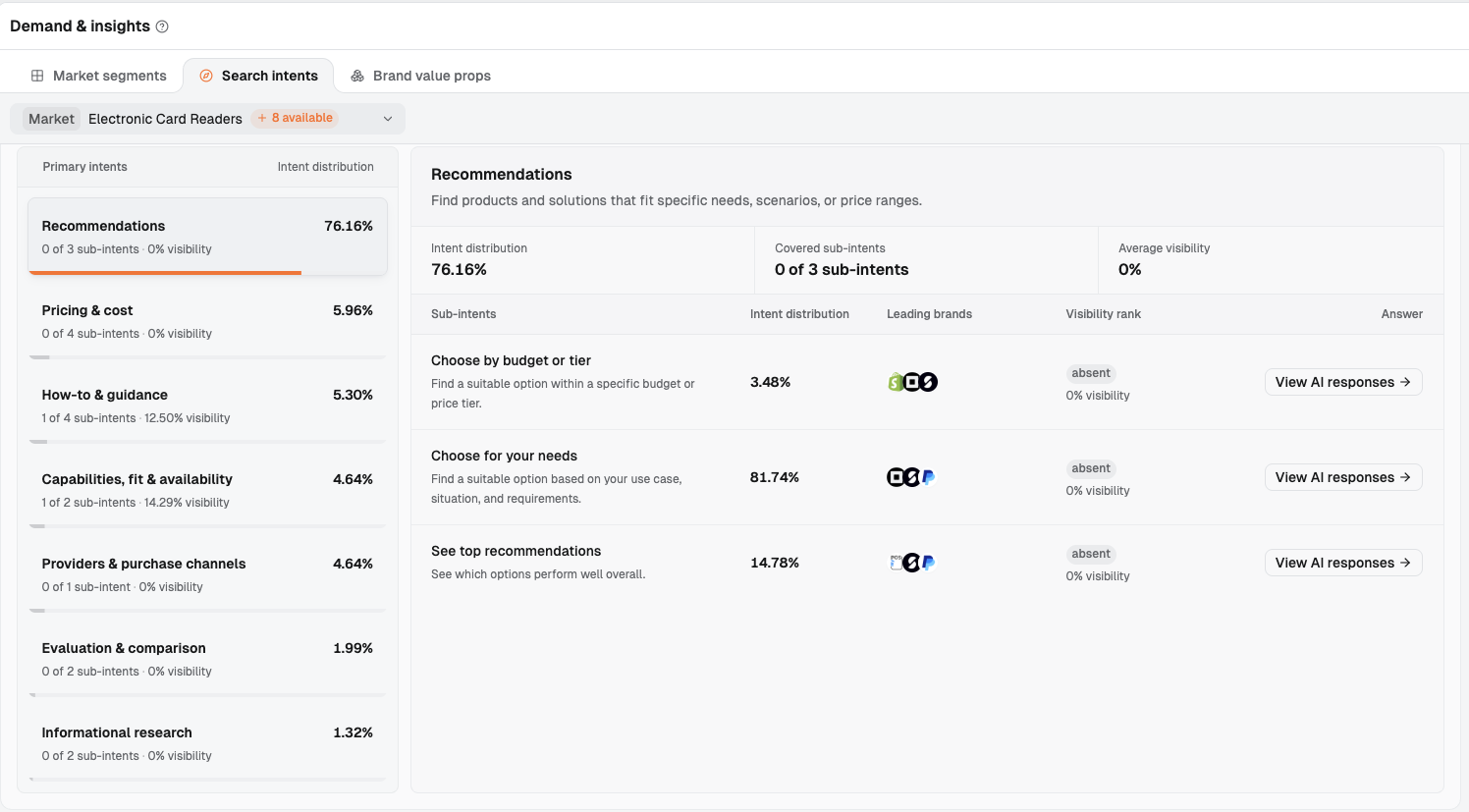
In the Electronic Card Readers market, all three sub-intents under Recommendations show absent and 0% visibility, meaning the selected brand is missing from the collected answers for these needs. Select an intent on the left, then open View AI responses for a sub-intent on the right. Leading brands lists brands to investigate further. This is an excerpt of the page, with the opportunity suggestions and summary cards in the middle removed.
Read the complete answer and record the brand's status, recommendation reasons, and sources. If the preview shows only the answer and omits the original question, record the question's full wording yourself first.
Keep a Record of Important Questions
Dageno's Monitoring settings provides forms for adding custom prompts in bulk and importing them through CSV. For bulk entry, put one question on each line and select the platforms and regions. CSV imports require four columns: prompt, platforms, regions, and language. Use them to specify the question, platforms, regions, and language. You can organize the questions you want to monitor around these fields.
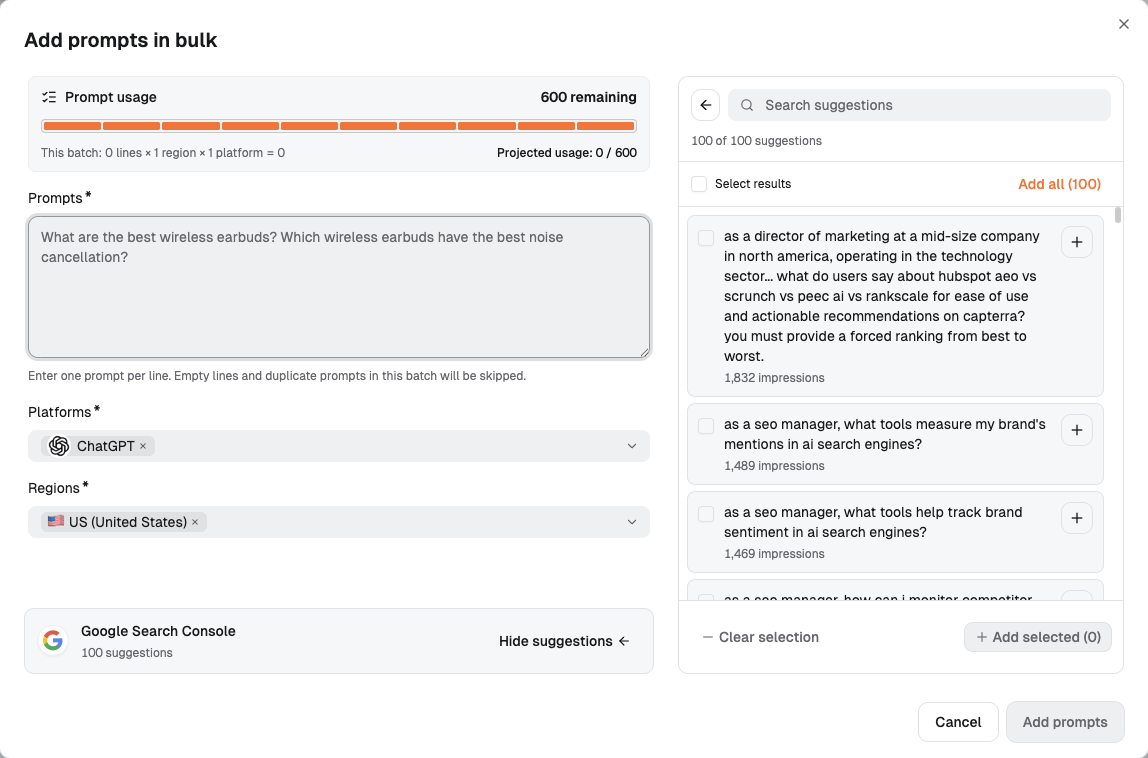
Enter one question per line in Prompts and select Platforms and Regions. Batch usage and remaining allowance appear above, with search suggestions on the right.
Your team should also retain the complete question, the business source it came from, the platform, region/language, observation date, and answer. Mark newly added questions separately so later reviews distinguish changes in existing needs from needs newly added to the prompt set.
Choose questions around user needs, then decide whether existing pages need more information. Google's generative AI search optimization guide explains that its systems understand synonyms and meaning. Sites should serve real needs and avoid mass-producing pages for query variations.
3. Which Possible Cause Should You Investigate First?
The following practical checks draw on official content guidance. Validate each one against your own answers, pages, and product facts. Identify a specific gap before assigning changes.
3.1 Can Key Content Be Accessed and Retrieved?
List the key pages that should answer these questions. Ask your web team to check public access, robots rules, response status, and indexing. Use Dageno to locate answers and relevant URLs, website logs to check access records, and Search Console or Bing Webmaster Tools to check indexing.
Google's website requirements for AI features cover indexing and eligibility for search snippets. OpenAI's publisher FAQ calls for checking whether OAI-SearchBot is blocked. Perplexity's robots.txt guidance states that its crawler does not index the body text of pages that block crawling.
If you find blocked access, page errors, or indexing problems, ask the web team to address them using the crawl and index checks in the AI visibility drop investigation. Opening a page in a browser completes only the ordinary access check.
3.2 Is the Brand Described as the Right Company and Product?
If an answer to a brand query confuses the company, product category, or customers, compare that answer with the homepage, About page, product pages, and cited external descriptions. If the answer offers no brand description you can verify, start with those pages too.
Microsoft's AI search content guidance emphasizes specific language and context: product descriptions need to explain uses. Vague claims such as “innovative” or “next-generation” provide little concrete information to assess. Apply that guidance to five parts of your brand description.
| What to check | Questions to answer | Where to correct a confirmed error |
|---|---|---|
| Names and relationships | What are the company, brand, and product names? Does the answer mix in an organization with the same name or an old name? | Brand relationships on the About page, product page names, and official descriptions |
| Product category | Are you selling software, a service, or hardware? Which category would customers recognize? | The opening homepage paragraph, product page titles, and introductions |
| Target customers | Who buys and uses it? Which markets does it mainly serve? | Descriptions of customers and intended users |
| Main uses | What work does it help users do? What conditions must be met before use? | Product descriptions and pages for the relevant tasks |
| Consistency across pages | Are old descriptions, regional pages, and external profiles still accurate? Do differences reflect versions or business lines? | Specific outdated passages; update owned information first and retain evidence for correcting external descriptions |
Here is an illustrative writing comparison:
Vague: “An all-in-one platform that helps businesses unlock their growth potential.”
Specific: “A mobile card reader for small merchants to accept card and contactless payments in their shops.”
The second sentence identifies the category, users, and task. When using it on your website, substitute your brand or product name and have the product owner verify its capabilities. If the device requires a phone or payment app, explain how it connects, where it is supported, and the conditions for use.
The homepage explains what type of products the company offers. Product pages explain uses and prerequisites. The About page explains the relationship between the company and brand. Companies with several products should describe each business line separately, avoiding a single name that combines the capabilities of different products.
Check versions and dates in external descriptions too. For example, an old report describing a payment-device company as a consultancy deserves a check. Different customer groups across product lines may be a legitimate distinction.
The web team can also check the name, website URL, and sameAs links to external profiles in Organization structured data. Google's organization documentation explains that this information can help Google identify an organization and distinguish it from others with the same name. The markup should match the visible page text and supplement the organization's identity information.
This review should leave you with a verified brand description and a list of pages to correct. During follow-up checks, first see whether answers get the category, customers, and uses right, then check whether buying questions lead to recommendations of your brand.
3.3 Does the Page Answer the Customer's Actual Question?
Open answers from the target sub-intent in Search intents and compare the user's requirements with your existing page. If the user asks about fees for accepting cards in a shop but the page only explains how card readers work, the content misses the need. If the user specifically requires contactless payments and the page leaves support unclear, there is a factual gap.
First confirm that the product fits, then check whether the relevant page explains the payment methods, fees, and conditions the user cares about. Google's guide emphasizes meeting real needs. Look for the missing answer, rather than counting how often a keyword appears.
3.4 Does the Cited External Evidence Describe Your Brand Accurately?
Use the source leaderboard in Citation analysis and Top cited pages to find the pages actually cited. Check whether they describe your brand, which version they cover, and whether they verify the conditions needed for this recommendation.
For example, if a review mentions the brand but tests only an old version, record the version difference. If a comparison never evaluates your product, note its inclusion criteria. Google's guide says its generative features can surface product information from blogs, videos, and forums. Once you identify a specific external gap, plan the work using these external evidence checks for products that fit but are not recommended.
3.5 Does the Page Offer Specific Information Worth Citing?
Open comparable content in Top cited pages. Look at the relevant facts, firsthand experience, or analysis it provides, then compare it with your own page. If your content contains only general definitions and adjectives, without even one verifiable detail about the product's suitability, you have a clear starting point for further investigation.
Google's guide recommends content with independent value, such as firsthand experience and original analysis. Compare your content with cited pages to check for missing verifiable product facts, usage experience, or evidence behind the analysis. Product explanations, actual usage instructions, and limitations can also provide concrete information. You can start without a large research report.
4. Why Do Competitors Appear? Compare the Questions, Reasons, and Sources
Choose Genuine Alternatives Before Comparing Numbers
When your brand has yet to receive mentions, Co-mentioned brands may offer few clues. Start with the market's brand leaderboard and answers in target sub-intents to find candidates. Confirm that they serve the same types of users, regions, and buying tasks. Distinguish complementary tools mentioned in answers from direct alternatives.
Keep the market, platform, region/language, time range, and prompt set fixed. Start with two fields to locate the gap:
| Field | Definition | How to read it |
|---|---|---|
| Visibility | Answers mentioning the brand within the selected scope ÷ all answers included in that scope | Shows the proportion of answers mentioning the brand; read the answers to check for recommendations |
| Visibility rank | The brand's position within the same comparison set | Read alongside Visibility; the brand count after the rank is the size of the comparison set |
A competitor may appear mainly in questions from large enterprises while you serve small teams. The overview helps you choose whom to investigate. To decide which page to change, return to the relevant need.
Follow Citation Sources to Specific Pages
Go to Citation analysis → Top cited sources and distinguish two numbers: citations is the number of times a source is cited; Cited in …% of responses shows the proportion of answers citing that source. The first is a count with no denominator. The second divides the number of answers citing the source by the number of answers in the current analysis scope.
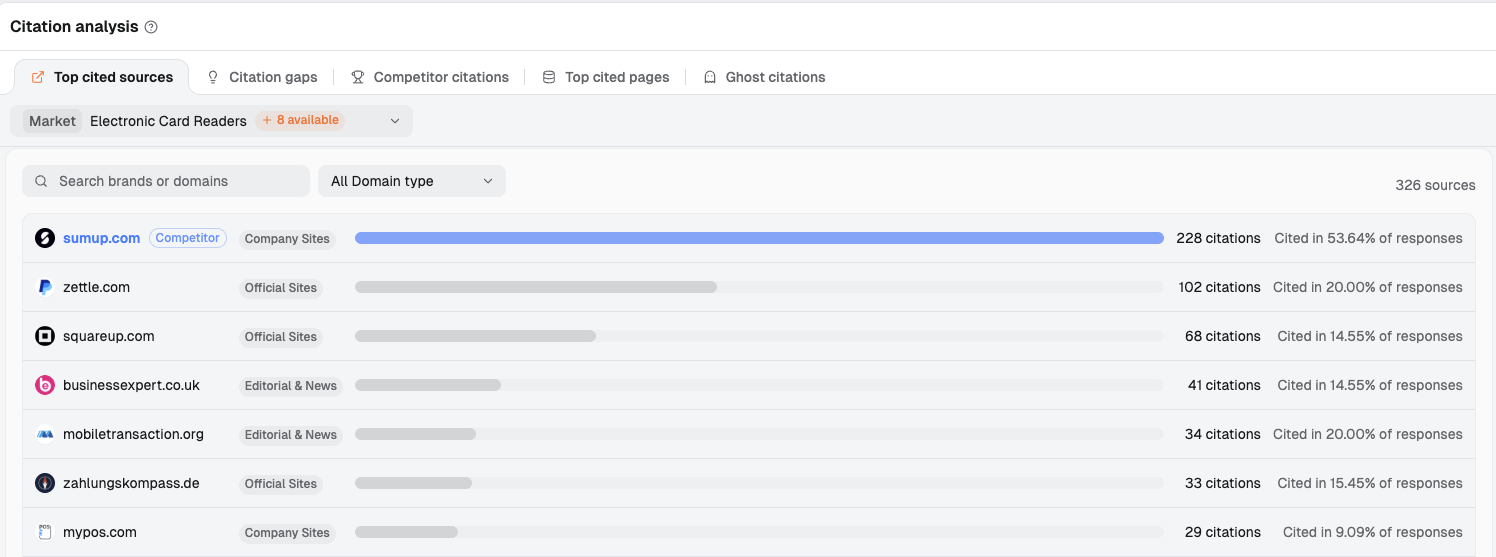
citations is the number of citations. Cited in …% of responses is the proportion of answers within the current analysis scope that cite the source. Read the columns separately. Source types such as Official Sites, Company Sites, and Editorial & News help distinguish official websites, company websites, and media. In this view, sumup.com, labeled Competitor, has the most citations. Its cited pages are a useful first place to investigate.
The source leaderboard identifies websites. Use three views to narrow the investigation:
- Citation gaps: Compare your brand with competitors to identify sources to investigate, then verify them against the relevant answers and pages.
- Competitor citations: Review cited URLs on the selected competitor's own domains to see which product information it has published.
- Top cited pages: Review specific cited pages, including third-party reviews and discussions, to understand the evidence they provide for a choice.
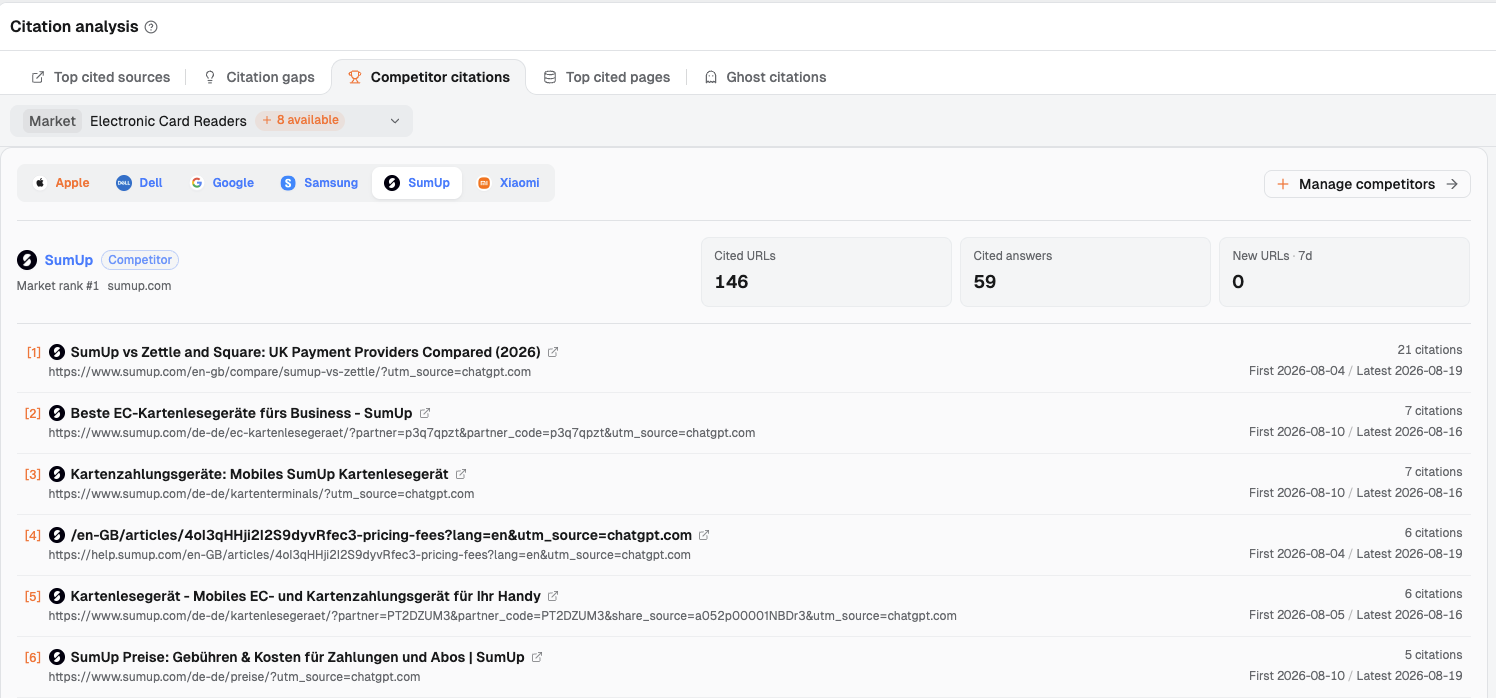
With SumUp selected, the view lists cited pages on its own domains, along with each page's citation count and first and latest citation dates. Use it to see what information the competitor has published. Find third-party pages in Top cited pages.
Check Whether the Evidence Supports a Recommendation Reason
Return to View AI responses for the selected sub-intent. Record the exact wording explaining why a competitor was chosen, open the corresponding cited page, and find the passage that supports it. A cited page may explain general buying criteria or describe a specific product's capabilities. Read the supporting passage to determine which it does.
Consider the illustrative scenario of a small merchant choosing a mobile card reader. If a competitor is recommended because its “monthly fees and per-transaction rates are clearly explained,” check whether the cited page states the rates, applicable regions, payment methods, and plan conditions. Then check your own product documentation for support for in-store card and contactless payments, how fees are calculated, and whether your website explains these conditions. Keep requirements added by the answer distinct from those the customer originally supplied.
Fill in one row for each answer under investigation:
| Question and region | Your brand's status | Competitor and recommendation reason | Cited page and supporting passage | Verification against your product facts | Next task |
|---|---|---|---|---|---|
| Complete question and buying requirements | Missing / mentioned / recommended / excluded | Record the exact wording | URL, relevant claim, and version | Does the product fit, and is supporting information already public? | Change a specific page or continue investigating |
Let the evidence determine the next step. If the product is a poor fit, ask the product or marketing owner to assess it. If the category is wrong, correct the brand description. If a page omits a required condition, add the relevant fact. If external information is outdated, prepare evidence for a correction. When citations still fail to support the recommendation reason, keep investigating before commissioning content.
5. Use Five Steps to Choose Your First Change
Accessible → Understandable → Relevant → Credible → Citeable is the editorial review framework used in this article, not an official standard or a Dageno feature. The five steps check access, clarity, relevance to user needs, evidence, and information worth citing.
| Step | What to check | Where to check | What to change if you find a problem |
|---|---|---|---|
| Accessible | Whether key pages are publicly readable and meet the relevant retrieval requirements | Website logs, robots rules, Search Console / Bing Webmaster Tools; use Dageno to identify URLs to check | Have the web team fix confirmed access or indexing issues and keep a URL verification record |
| Understandable | Whether names, category, customers, and uses are correct | Answers to brand queries, the homepage, About page, product pages, and cited descriptions | Have product and content owners correct the brand description and specific inaccurate passages |
| Relevant | Whether the page addresses the conditions required for the task | Search intents → specific answers, compared with product or use-case pages | Add missing suitability conditions; pause the content task if the product is a poor fit |
| Credible | Whether the claims behind a recommendation have real supporting evidence | The source leaderboard, Citation gaps, Top cited pages, and original sources | Correct inaccurate facts and add verifiable usage records or review evidence |
| Citeable | Whether valuable information clearly identifies the subject, conditions, and source | Your page's body text, compared with relevant cited pages | Clarify which brand the product belongs to, along with methods, dates, and sources, on the page that contains the information |
Address blocked access and incorrect brand facts first, then information gaps that affect buying decisions. If several issues are confirmed, prioritize tasks that serve important customer needs, have clear evidence, and have an owner. Metrics measure different things and use different denominators, so the lowest number may be a poor guide to where effort matters most.
Return to the small-merchant mobile card reader example. Suppose the page is accessible, but the homepage says only “growth platform” and brand answers describe the company as a marketing service provider. Start by verifying and correcting the category and product description. The task could read:
The product owner confirms the device category, main users, and supported payment methods. The content owner updates the homepage introduction and product page opening to explain the company–product relationship, uses, and limitations, and checks the wording on the About page.
If the brand description is already accurate, continue with the in-store payment scenario, fee conditions, and cited evidence.
Record the page URL, question, owner, completion date, and what to review next, so the next round can be compared with specific changes.
6. After Making Changes, Is Your Brand Appearing Where It Was Missing?
Keep the original prompt set and change dates. Review new answers on the same platforms, in the same regions/languages, and across comparable time windows. First confirm that the records have updated. Then check three things: whether the brand appears or is recommended, whether the category and conditions are accurate, and which information the cited sources provide.
Use Visibility and Visibility rank for the overall picture. Record both brands' visibility and confirm that the comparison set is unchanged before deciding which competitor you have overtaken. If visibility started at zero, describe the change using the current proportion and answer count.
For individual pages, open URL details in Effect tracking:
| URL detail field | Numerator and denominator | What it tells you |
|---|---|---|
| URL citation rate | Answers citing the URL ÷ existing answers included in the selected date range | What proportion of answers cite this page? |
| Brand mention rate | Answers citing the URL and mentioning the brand ÷ answers citing the URL | When the page is cited, does the answer text mention the brand? |
| Ghost citation rate | Answers citing the URL without mentioning the brand in the answer text ÷ answers citing the URL | How often is the brand missing from the answer text when the page is cited? |
The last two metrics use answers citing that URL as their denominator. Read them separately from market-wide visibility. If no answers cite the URL, both rates are undefined; record “no citing answers yet.”
After you add a published URL, Effect tracking checks its citations and brand presence in existing answers; it does not initiate real-time crawling. Your team can set a review date and continue observing as new answers become available. If sources change, open newly cited pages and those still in use to see whether they use the corrected facts.
Record page edits and answer changes separately. Bing's AI Performance trend guidance lists changes in question demand, content, and models among the factors that affect results. Before-and-after differences are observations and cannot be attributed solely to one content edit.
If the brand description is accurate but buying answers still leave it off the shortlist, continue checking fit and selection evidence. If answers still use the old category, continue checking sources. If there are no new answers, keep the item pending review.
7. Find Where Your Brand Is Missing Before Deciding What to Fix
Without knowing which questions leave your brand out and which information is missing, it is hard to decide what to fix. Keep the questions and answers, then compare the brand description, buying conditions, competitor recommendation reasons, and sources to choose a specific task.
Dageno helps you examine brand performance in your target market, the needs where competitors lead, and the answers and pages that warrant further investigation. Once the gap is confirmed, assign the task to the right owner and agree which question to return to when checking the result.
Frequently Asked Questions
Does Asking AI “Do You Know My Brand?” Measure Brand Visibility?
It only checks the description given after you name the brand. To see which options customers encounter when they leave your brand name out of the question, also review category, competitor-alternative, and use-case questions. Keep the two sets of results separate, then verify whether the answers identify the company, product, and uses accurately.
AI Describes Our Brand Correctly but Leaves Us Out of Category Recommendations. What Should We Check First?
First check whether your product meets the buying requirements in the category question. If it does, read the reasons given for recommending competitors and open their cited pages. Check whether your own public information explains those same conditions. An accurate brand description addresses identity and basic information; product fit and selection evidence still need a review.
Why Is Our Website Cited Without Our Brand Being Recommended?
The page may be supplying only general knowledge or buying criteria. Open the complete answer, identify the statement supported by the citation, and check whether your brand meets the user's needs. If the page is about your own product, check whether it clearly identifies whose product it is, its conditions for use, and the reasons to choose it.
What Can a New Brand Improve Without Original Research?
Start by making product facts, target customers, and conditions for use accurate. Organize real usage instructions, customer examples you have permission to share, and comparisons supported by evidence so customers can check whether the product fits. If testing is needed, design a method and record the conditions. Avoid manufacturing results simply to have research numbers to publish.
When Should We Review Page Changes, and How Do We Distinguish Improvement From an Occasional Mention?
Review on the date your team has agreed, using the new answers available; there is no universal number of days to see results. Retain the original questions, platforms, regions, and change dates. Use comparable records to check whether the brand keeps appearing, whether its description is accurate, and whether citations use the updated information.
References
- Google Search Central: Generative AI Search Optimization Guide
- Google Search Central: AI Features and Website Requirements
- Google Search Central: Organization Structured Data and Organization Identification
- Microsoft: Organizing Content for AI Search Answers
- Bing Webmaster Tools: AI Performance Metrics, Data Scope, and Trends
- OpenAI: Publishers and Developers FAQ
- Perplexity: robots.txt and Body Text Indexing
About the Author
Updated by
Dageno
Dageno is the research and insights team at Dageno AI, publishing industry reports and expert analysis on AI Search Visibility, Generative Engine Optimization (GEO), and AI-powered search discovery.
Related Articles
The 13 Best AI SEO Content Optimization Tools in 2026: Tested and Ranked
Dageno • Mar 13, 2026
SERP Features in 2026: The Complete Guide to 11 Types and How to Optimize for Each
Dageno • May 14, 2026
Best Tools for Tracking AI Citation Authority and Brand Mentions
Dageno • Apr 07, 2026
Top LLM Visibility Service Agencies for Brands in 2026

Ye Faye • Apr 20, 2026